
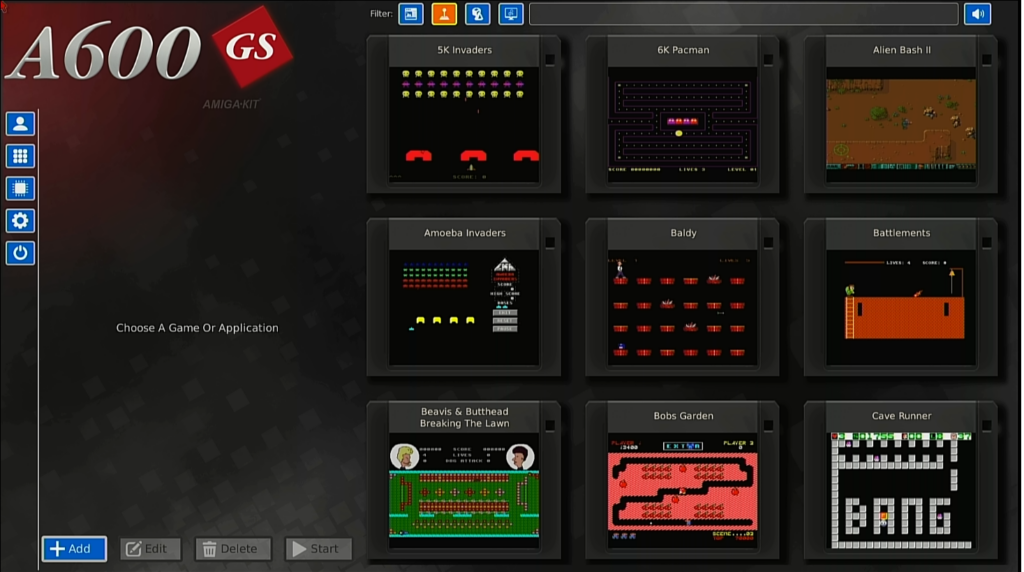
First of all, I am really impressed by this A600GS, it is quite easy to Add New Games to it, by clicking the button at the bottom-left [+ ADD] then search out the folder
For example to add Baldy, Goto “Games\B\Baldy” inside that folder click on “Baldy.hdf” and then goto the Image section, go back to the “Games\B\Baldy” folder, and then select what image you want to add, which will then show up in the Carousel
If you look at the screenshot above, You may notice “Beavis & Butthead Breaking The Lawn” this was accomplished by adding “Beavis & Butthead” to the Title, and “Breaking The Lawn” to Subtitle
I have tried to make it as easy as possible to add Games to the A600GS
The A600GS is excellent, and I am very happy with it, and if you are a big Amiga fan, Why not get your own, You will not regret it, They have designed it to be as user-friendly as possible, and Adding Games to it, is very simple, just add the ADF/HDF file, then an Image, and it will appear in the Game List
—
The Archive contains instructions on how to add the Games to the A600GS, I hope I have made it as easy as possible, since all Games are in separate folders (A-Z) then in their own folder, along with in game screenshots and a title screenshot – Please read the A600GS document for further information
You can then choose which Games/Demos you wish to add, I have not personally added them all, But I have added some Games I love to play a lot
—
If you have NEVER downloaded this before, Grab BOTH archives below – For updates just grab the Update archive (its smaller to download)
—
Download Size: 310MB (Rounded-Up)
—
NOTE: This Download is Quite Huge, This includes ALL the Games and Images for Each Game, Most Games are packed into HDF (1,024KB) Images, with Stubborn Games/Demos are provided as ADF 880KB Images
This archive contains the most recent updates (in this case, Oct-Dec) so if you have the above archive, just download this instead of the larger archive above
—
Find out more by visiting the A600GS website for further information